HorecaPOS is POS software from OptimumPOS for restaurants, cafés, snack bars and takeaways in the Netherlands and Belgium. Tables, ordering, checkout and card payments, even when the internet drops out for a while.
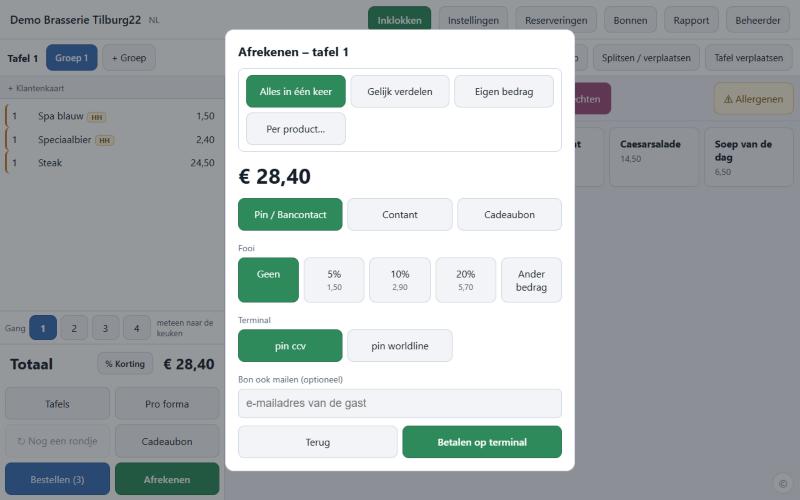
From the first order to closing the day. Switch off what you don't use and you won't see it on the POS either.
Your own floor plan with tables per room. See at a glance which tables are occupied and for how long. Move, merge and split tables.
Fast ordering with options and courses, split the bill (evenly, by product or a custom amount), discounts, tips and gift cards.
Integration with your card terminal: the amount goes to the terminal automatically. Also cash, with rounding, or via a cash recycler (CashDro, Cashmatic, Cashlogy, Glory, Cikam).
Order tickets to the right printer, or a kitchen display instead of paper. Even in the language of your kitchen staff. Receipt printers via network, USB, serial, Bluetooth or built-in (Sunmi, iMin).
Quick counter sales, takeaway and delivery orders.
Orders from Thuisbezorgd.nl (Takeaway.com in Belgium) come straight into the till, without an intermediary. With a kitchen ticket to kitchen and bar, an alert for every order and the courier to follow live. You send the menu, prices and opening hours from the till.
Keep track of reservations and walk-ins, with a text message when the table is ready. Bookings from TheFork, Formitable, Zenchef, Resengo and OpenTable appear automatically on the floor plan; arrivals, no-shows and payments go back to the platform.
Loyalty card with points, collecting with Piggy or Joyn, asking for a review on Google or Trustpilot after the visit and replying to those reviews in the POS, happy hour, set menus and all-you-can-eat.
Stock per product and option, and ordering from your suppliers by email, file or integration. Products by the kilo with all Aclas scales: at the till (cable, Bluetooth or network), label scales and AI scales with product recognition. Also A&D, Adam Equipment, Avery Berkel, Avery Weigh-Tronix, Balanzas Marques, Baxtran, Bizerba, Brecknell, CAS, Datalogic, Dibal, DIGI, Dini Argeo, Excell Precision, Gram, Ishida, Kern & Sohn, Mettler Toledo, Minebea Intec, Ohaus, Precia Molen, Precisa, Rice Lake, Rongta, Sartorius, Star Micronics, T-Scale, UWE, Wedderburn, Wintec and Zebra.
Connection with your beer tap system or flow meters (including Van Duijnen, Beconet, TapSystems, Gruber, WMF, Berg and Kegboard): every litre poured ends up on the bill. With controlled pouring, the tap only opens after the item is rung up.
X and Z reports, turnover per day and period, staff and working hours. Daily turnover goes automatically to 15 accounting packages, such as AFAS, Exact Online, Horus, Moneybird, Odoo, SnelStart, Twinfield and Yuki, or as an export file to your accounts: UBL (Peppol), XAF or ready-made for your package. For your own dashboards, your sales data goes to Power BI, Looker Studio, Excel, Google Sheets or Tableau: via an API, in real time per receipt or as daily files.
Let guests follow along on a second screen or a separate tablet, with product photos.
Every staff member works in their own language. The receipt is in Dutch by default, or in a language of your choice.
With the integration for the fiscal black box (FDM), for businesses in Belgium.
On Windows, macOS, Linux and Raspberry Pi you choose: MySQL or MariaDB, the built-in database (nothing to install) or PostgreSQL. Switching takes one button, with all your data. Backups are interchangeable between all databases. On Android the POS uses the built-in database.
With a free account you can see your POS even when you're not on site, for example at home or on the go. Even if the POS has no fixed internet address.
Coming soon: open the POS remotely with your own PIN, for example to change products and prices.
The POS runs in your own business, on an Android POS, a Windows PC, a Mac, a Linux PC, a Raspberry Pi or a Chromebook. If the internet drops out, you simply keep ordering and taking payments. Ordering tablets in the venue talk directly to the POS.
A backup every night, and on Android also in the OptimumPOS cloud.
Get started in three steps. Need help? Pin Voordeel is happy to install it for you.
Download HorecaPOS for Android, Windows, macOS, Linux (graphical installer, .deb or .rpm), Raspberry Pi or Chromebook and install it on your POS. Go to downloads
Enter your personal and company details and confirm your email address. Create account
Create a pairing code in the POS (Settings → Business → Customer portal) and enter it after logging in.
Nothing for the first 3 months: you use the app free of charge with no strings attached, and try it out yourself in your own business, without a contract or appointment. The trial period starts as soon as your POS first connects to OptimumPOS. After that you continue with a licence; Pin Voordeel will be happy to tell you what it costs. Your account shows when your trial period ends; the POS also reminds you during the last 14 days.
An Android POS or tablet (for example Sunmi), a Windows PC, a Mac, a Linux PC, a Raspberry Pi or a Chromebook as your POS. You can use extra tablets or phones as ordering screens. Connect a network receipt printer and a card terminal via Settings. The receipt printer can also be connected via USB, a serial port, Bluetooth or built in (Sunmi, iMin), or be attached to an order screen.
On Android (app, also for Sunmi POS devices), Windows 10 and 11 (installer), macOS 11 or later on Macs with Apple Silicon and Intel (.pkg installer), Linux (graphical installer, or the .deb package for Ubuntu, Debian and Mint and .rpm for Fedora, RHEL and openSUSE), Raspberry Pi 3, 4 or 5 with 64-bit Raspberry Pi OS (graphical installer or .deb) and Chromebook (the Android app from Google Play). The installer sets up everything that's needed, including the database. Choose your system on the download page.
Yes. A Raspberry Pi 4 or 5 with 64-bit Raspberry Pi OS is an affordable, energy-efficient POS server: it runs the POS and the database, and your ordering tablets, kitchen display and receipt printer connect to it over the network. Choose 4 GB of memory or more and connect a screen if you also use it as a till. Install it with the graphical installer or the .deb package from the download page.
By default the built-in database (PGlite): nothing to install. On Windows, macOS, Linux and Raspberry Pi you can also choose MySQL (8.0 or newer), MariaDB (10.6 or newer) or PostgreSQL, for example on your own server. Switching takes one button in the POS settings and brings all your data along; the POS makes a backup first. Backups are interchangeable: a backup from one database can be restored into any other. On Android the POS uses the built-in database.
In 42 languages: Dutch, English, German, French, Spanish, Portuguese, Italian, Polish, Czech, Slovak, Hungarian, Romanian, Bulgarian, Croatian, Serbian, Albanian, Lithuanian, Latvian, Ukrainian, Russian, Turkish, Arabic, Moroccan Arabic (Darija, in Arabic and in Latin script), Berber (Tarifit and Tamazight), Kurdish (Kurmancî and Soranî), Persian (Farsi), Dari, Pashto, Syriac-Aramaic (Suryoyo), Tigrinya, Amharic, Somali, Papiamento, Sranan Tongo, Hindi, Urdu, Indonesian, Vietnamese and Chinese. Every staff member chooses their own language and the kitchen ticket is in the language of whoever places the order. The customer receipt is in Dutch by default; in the business settings you can choose another language. The installation speaks your language too: the installer starts in your computer's language (otherwise English), on Windows and Linux you can choose another language on the first screen, and the POS then starts straight away in that language.
All Aclas scales. Scales at the POS, such as the OS6X, OS2X and the PS and CS series, connect via cable (RS232/USB), Bluetooth or the network, even several at once. Labels from label scales (LS series, LH15X) are simply scanned at the POS. The POS can also run on a PC or AI scale itself (TS6X, TS5 series, iS6X and other AI scales with product recognition). Choose the model in the POS; the rest is filled in for you. A&D, Adam Equipment, Avery Berkel, Avery Weigh-Tronix, Balanzas Marques, Baxtran, Bizerba, Brecknell, CAS, Datalogic, Dibal, DIGI, Dini Argeo, Excell Precision, Gram, Ishida, Kern & Sohn, Mettler Toledo, Minebea Intec, Ohaus, Precia Molen, Precisa, Rice Lake, Rongta, Sartorius, Star Micronics, T-Scale, UWE, Wedderburn, Wintec and Zebra work too: connect their checkout and price-computing scales (e.g. EK-i, Swift, FX110, FX120, FX125, FX131, 7820, ZP900, BM1000P TOP, TW, VW, XTA, XTA-P, CS 300, 6702U, 6720U, PD-II, PDN, PDS-B, Magellan 9300i, KS-400, D-POS 400, G-325, PI-100, DS-781, DFW, TPE, XFOC, ZFOC, RPB, RFC, Ariva-S, Viva, Signum, Combics, Aviator 7000, Valor 7000, Ranger, Defender, DP400, C 210, XB, BenchPro, Entris, mG-T, ASEP, TSDS983, ACS-S60E, MP7000) with a cable (RS232 or USB), and scan the label of their label scales (e.g. Xs, XTs, XTi, BM500 ETQ, K-Class Flex, KH II, CL5500, M-500, D-900, CS-2200, SM-120, SM-6000, Uni-7, bPlus, UC Evo, Corail 500, RLS1100, PA15, TSSM120) at the till.
Almost any receipt printer: HorecaPOS prints with ESC/POS or Star. Connect it via the network (IP address), USB, a serial port (COM) or Bluetooth, use it as a Windows or CUPS printer, or print on the built-in printer of a Sunmi or iMin. A mobile printer on a handheld works too: the order screen then prints the tickets the till prepares for it. If a printer fails, the kitchen tickets go into a print queue and are printed again automatically.
Then the POS just keeps working: ordering, printing order tickets and checkout all happen in your own business. Only things that run over the internet, such as the online customer portal, wait until the connection is back.
Yes. For Belgium the POS connects to the fiscal black box (FDM). Pin Voordeel will help you set it up.
The till posts the daily revenue by itself every day in Acumulus, AFAS Profit, Exact Online, Moneybird, Silvasoft, SnelStart, Twinfield or Yuki (Netherlands), in Exact Online, Horus, Silvasoft or Yuki (Belgium), and in Microsoft Dynamics 365 Business Central, Odoo, QuickBooks Online, SAP Business One, Xero or Zoho Books. For other packages you download the journal as UBL (Peppol), XAF 4.0, CSV or ready-made for AccountView, AFAS, Asperion, e-Boekhouden.nl, Exact, InformerOnline, KING, KOMAS, Odoo, Sage BOB 50, SAP Business One, SnelStart, Twinfield, Winbooks or Yuki. The till only shows the packages that work in your country.
Yes. If your staff clock in and out, the till creates the file with the hours worked (and the revenue per staff member) for your payroll package: ready-made for Loket.nl and SD Worx, and an hours list for ADP, AFAS Payroll, Employes, Exact Online Loon, Nmbrs and the Belgian social secretariats, among others. The revenue goes automatically every hour to your scheduling in Deputy, Dyflexis or Shiftbase, and as a file to Eitje, Nostradamus, Planday, Shyfter and Strobbo, among others; this also works without clock in/out. The till only shows what works in your country.
Yes, both are optional. With dayparts you choose which products belong to, for example, breakfast, lunch, dinner or the summer menu: they can only be sold then, at the till and in the webshop. A daily deal, such as spareribs for a fixed price every Tuesday, or a discount only in summer, is set up as a happy hour. Per product you set a separate price for takeaway and delivery, and per product or category you choose whether it is sold for dine-in, takeaway and delivery. Each branch has its own menu.
Yes, if you switch it on. You add the business customers, optionally with a credit limit and their own payment term. At checkout you choose "On account": the receipt is a normal sale and the till creates the invoice straight away (also as UBL via Peppol) and sends it. The customer pays later in store, in cash, by card or with a gift card. You see outstanding invoices in one overview; in the accounts it goes to accounts receivable.
Yes. Turn on Review management and log in with your own Google Business Profile or Trustpilot Business account; you don't need your own API key. The POS fetches new reviews every 30 minutes and you reply from the POS in your business's name. The reviews stay yours: they're on your own page and only in your own POS. No Business Profile or Trustpilot account yet? The POS shows you how to sign up yourself.
In Belgium the till connects to the black box (FDM) for the registered cash register system (GKS 2.0), and exports the daily revenue as UBL according to Peppol BIS 3, the format of Belgian e-invoicing, which has been mandatory between businesses since 1 January 2026. In the Netherlands the till produces an XML Auditfile Financieel (XAF 4.0), the standard of the Dutch Tax Administration (Belastingdienst) that is mandatory from 2027, and the XML Auditfile Afrekensystemen (XAA) with all receipts, corrections and events of the till. In Belgium the till records staff clocking in and out in the black box; the Dimona declaration is filed by your social secretariat or scheduling tool.
Not for the POS itself. With an account you can also view and manage your POS online and keep your billing details up to date.
Choose "Forgot password" on the login page; you'll receive an email with a link to set a new password.
Use the app free for 3 months, no strings attached. Download it, create an account and pair your POS.
 HorecaPOS